ChequePrinting.Net 5.9.3
Enterprise Cheque Printing & Management Software

How to retieve all the cheque records for a payee?
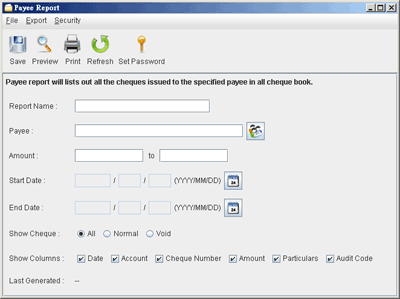
- In main windows, click "Report" icon.
- Click the
 icon and choose "Payee Report" to to launch "Payee Report" window.
 - You need to provide a name for this report.
- Provide the payee name or click
 to load from Payee List.
 - You can specify other report criteria, like Amount, Start Date and End Date of issued cheque.
- You need to save the Report before making Preview. You can refer to the "Last Generated" to see how update the report is.
How-to Articles
- How to retieve cheque records from an account?
- Batch Printing of Cheques
- Create Cheque Book
- How to create cheque template?
- Create payment voucher for a cheque
- How to Create User Login?
- Choose Different Numbering System
- Customize Cheque Printing
- How to customize the Payment Voucher?
- Where to download cheque template?
- Need help in create cheque template?
- How can I import cheques from file?
- How can I import payee from file?
- Can I store the Payee information?
- How to retieve all the cheque records for a payee?
- How to prepare a cheque?
- How to print a cheque?
Copyright © 2024 Evinco Solutions Limited.